What is robot downtime?
Senne Van Baelen4 min read

Ask three people on the floor whether a robot was down yesterday and you get three answers. The shift lead says no: it never threw an error. The maintenance tech says yes: it sat on its charger half the afternoon. The operations manager wants a percentage and does not much care which.
They are all describing the same robot. What differs is which minutes they think should count. Before a downtime figure means anything, you have to say which ones do.
Engineers settled the categories long ago
Equipment makers have argued about this for decades, mostly in semiconductor fabs, where an idle machine costs a fortune. The result is SEMI E10, the standard that splits a machine’s time into six states:
- Productive: doing the job it is there for.
- Standby: able to run, but not running, for lack of work or input.
- Engineering: running for tests or evaluation.
- Scheduled downtime: able to run, but taken out on purpose, for example for preventive maintenance.
- Unscheduled downtime: not able to run, for example waiting for a repair.
- Non-scheduled time: not planned for use at all, like a shift nobody works.
Two ideas from E10 matter for robots. Standby is not downtime: a robot with no job is not broken. And non-scheduled time sits outside the calculation entirely: a weekend nobody plans to work cannot be lost.
Manufacturing KPIs say the same thing in other words. ISO 22400-2 measures availability as actual production time over planned busy time, the time the plan says the machine should be working. The OEE method does the same against planned production time: breaks and shifts with no orders stay out of the sum, while a changeover inside the plan counts as a loss.
What a robot actually tells you
A robot does not report “downtime”. It reports a state, and the vocabulary is getting standard too. VDA 5050, the open interface between driverless vehicles and the fleet control above them, has every vehicle send fields like these (version 2 names):
operatingMode: automatic, semi-automatic, manual, service or teach-in. Manual and service mean a person has taken over.safetyState: an emergency stop, or afieldViolationwhen the safety scanner sees something in its protective field.errors, each with a level: a warning, or fatal, meaning the vehicle cannot carry on until someone steps in.paused, and whether the battery ischarging.
Version 3.0, released in March 2026, renames some of these and adds levels, but the idea holds: the robot tells you what it is doing every moment, and somebody has to decide which of those moments were lost.
How ROCO counts it
ROCO reads each robot’s activity every minute, whatever the vendor calls it, and files it in a group (blocked, fault, maintenance, parked, charging…), and each group in a class. The classes are where the decision is made.
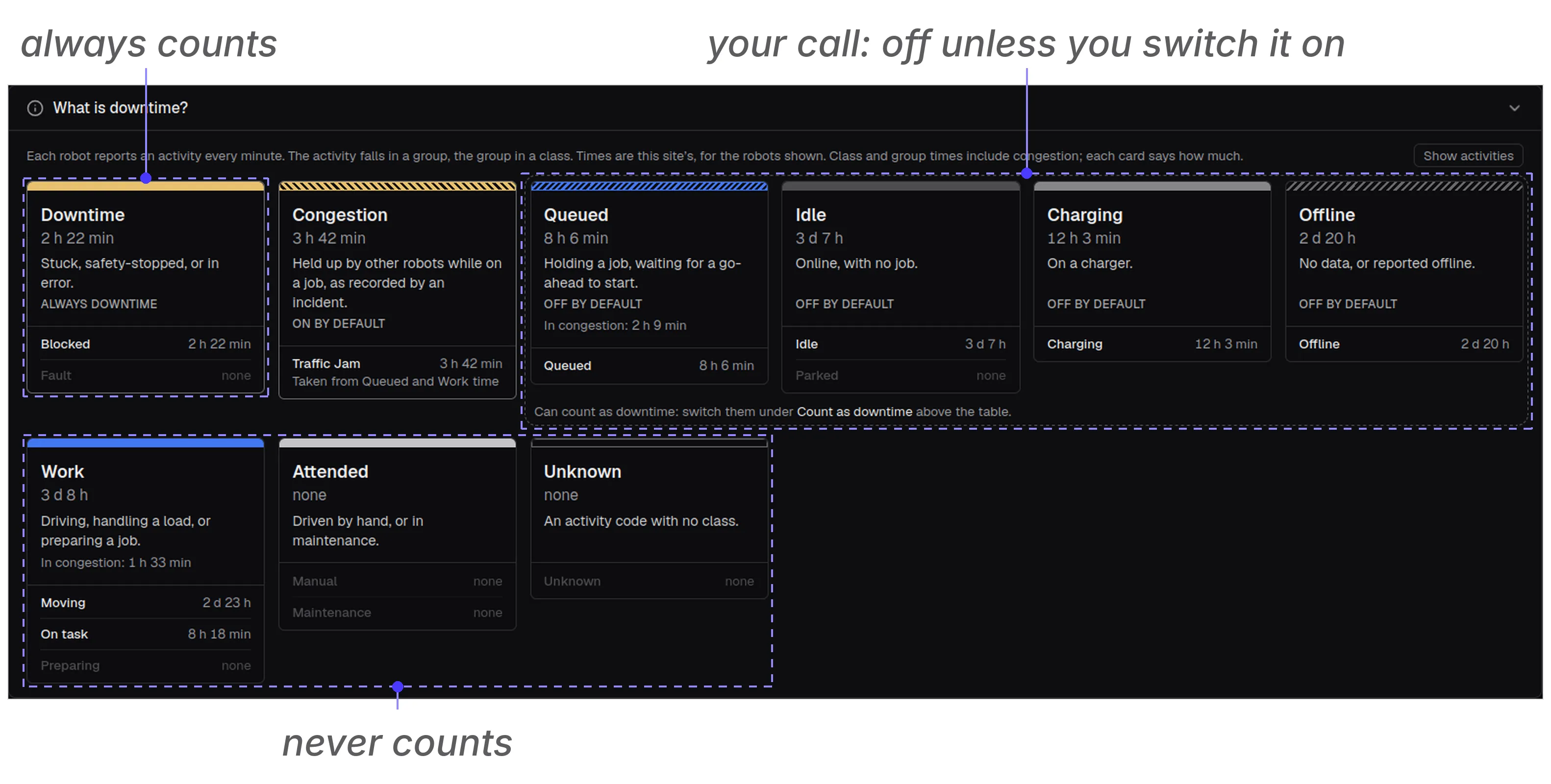
- Downtime always counts: stuck, safety-stopped, in error, or in maintenance. This is E10’s unscheduled downtime, plus the scheduled kind: either way the robot is there to work and can’t.
- Congestion counts by default: held up by other robots while on a job, as recorded by a traffic-jam incident. E10 would call a robot waiting on others standby. We count it, because in a fleet the others are the same system, and a jam is time the fleet lost to itself.
- Your call: queued (holding a job, waiting for the go-ahead), idle (online, no job), charging, and offline (no data, or reported offline). Most sites leave them off: they are E10’s standby, time lost to the flow around the robot, not to the robot. Offline is the odd one out: no data can mean a broken robot or one nobody needed today, and ROCO can’t tell which.
- Never counts: work, attended (driven by hand) and unknown activity codes.
Which groups make up Downtime, and which classes start switched on, is set per site. Open “What is downtime?” on the Robot Availability page and you see your site’s rule, with its own hours in each card.
Only the hours you plan to run
ROCO counts downtime against your site’s shifts, not against the clock. That is ISO 22400’s planned busy time and E10’s non-scheduled time applied to a warehouse: nights, weekends and holidays outside the shifts are not lost time. A robot offline from Friday 22:00 to Monday 07:00 has been gone 2 days and 9 hours, but on a site with a short Saturday shift only the 9 hours inside shifts count. An outage entirely outside shifts isn’t listed at all, and robots online outside shifts get a row of their own under the robots, so you can still see them.
A site with no shifts set counts every hour, and the page says so.
Decide what counts for you
Whether a queued robot is lost time depends on why it is queued. If your stations run empty, robots waiting on them is a planning problem you want in the figure. If they wait on purpose, it isn’t.
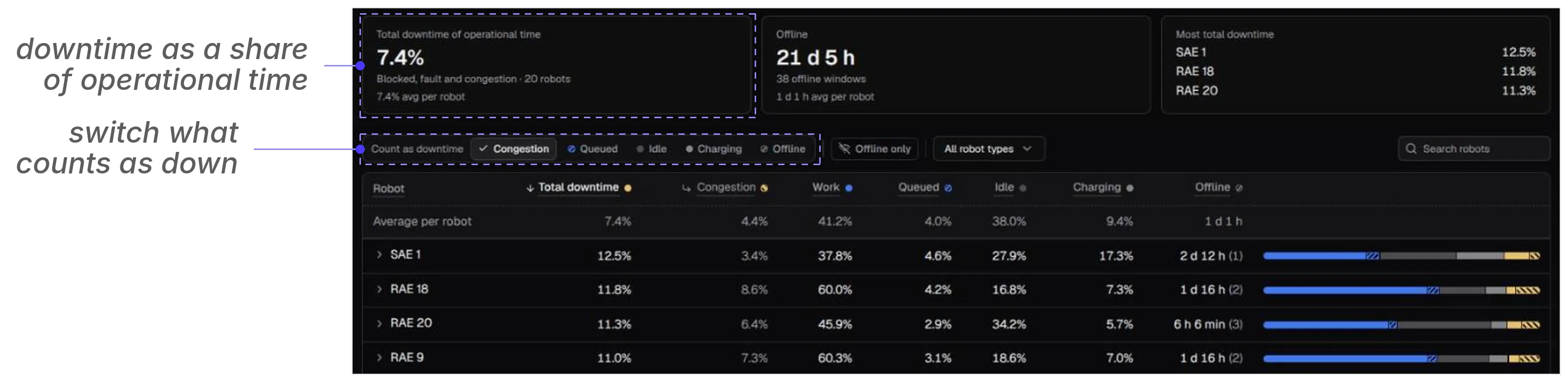
So the page lets you switch it. Under Count as downtime, turn congestion, queued, idle, charging or offline on or off, and every figure on the page follows: the share of operational time lost, each robot’s total, and the fleet average every robot is set against. The report PDF carries the same settings in its header and ends with the same explanation. The definition is yours; ROCO shows which one you are looking at.
A note on the figure people often ask for next: mean time between failures (MTBF) and its robot cousin, mean time between interventions (MTBI), count how often a robot stops rather than how long. A robot that stops for one minute forty times a shift and one that stops once for forty minutes have the same downtime and very different problems. That is why ROCO shows MTBI in every shift’s figures, even though it is a practice term in field robotics rather than a standard.